Q-Learning Visualization
A Python and Tkinter visualization of Q-Learning, with an in-browser demo. An agent learns a path across a grid while you place obstacles.
Interactive demo
Episode 0 Steps 0
- Agent
- Visited
- Obstacle
- Empty
Click or tap a cell to toggle an obstacle. Start and goal stay open. Reset clears what the agent learned and leaves obstacles in place.
Screenshots
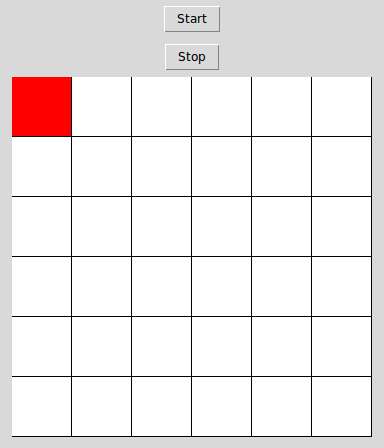
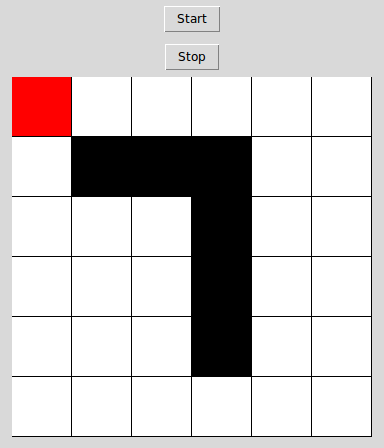
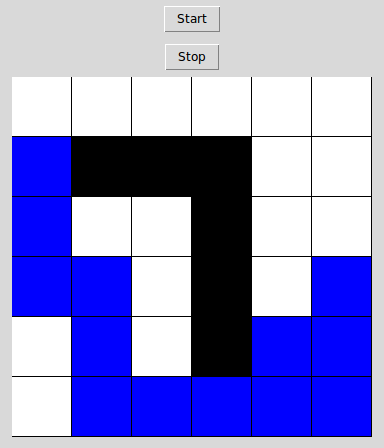
Overview
A Tkinter application that visualizes Q-Learning, a model-free reinforcement learning algorithm. An agent learns a path from the top-left corner of a grid to the bottom-right. Clicking a cell places an obstacle the agent has to learn to avoid.
The interactive demo on this page is the same grid in the browser. Click or tap a cell to toggle an obstacle (the start and the goal stay open). Start, pause, and reset control the loop. The sliders are the learning rate (alpha), the discount (gamma), the exploration rate (epsilon), and the speed. Visited cells use the blue from the screenshots below, and the agent is the same red.
The code and the screenshots on this page are from the public repository p-severin/Q-Learning.
How the grid works
The default environment is a 6×6 grid. For that grid the Q-matrix has shape (36, 4), with one value for each action: up, right, down, and left. Reaching the goal pays a reward of 100, and the learning rate (gain) is 0.5. The window redraws state transitions every 10ms. Grid math uses NumPy.
In the window, red is the agent, blue cells are visited positions with learned Q-values, black cells are obstacles, and white cells have not been visited. Start and Stop control the learning loop.
The command line can change the grid size, the reward, and the learning rate:
python QAgentVisualizer.py --size 8 --reward 150 --gain 0.7--size defaults to 6, --reward to 100, and --gain to 0.5.